Integrating your ecom platform and SAP B1 should feel like you’re starting afresh—the last thing you want is to transfer across existing errors. Post-audit is the perfect time to clean and organize your data, especially if you’ve got years and years of old, wrong information floating around. It’s up to you how you want to organize your data, but at the very least, delete duplicate entries, format data in the same way, and fill in any missing information.
| Must-Have Feature | Why It Matters |
|---|---|
| Visual configuration (CAD/3D options) | Drives clarity and speed in complex B2B quoting. |
| Real-time pricing & BOM automation | Ensures quotes reflect up-to-date ERP inputs. |
| Advanced approval workflows | Streamlines multi-level sign-off without bottlenecks. |
| Low-code/no-code rule engine | Puts configuration logic in business users’ hands. |
| Multi-language & multi-currency support | Critical for global quoting and partner portals. |
| Built-in ERP integration | Avoids the dev drain of middleware and sync issues. |
Cut document generation time from hours to minutes, without sacrificing compliance. Book a tailored demo →
| Model | Key Benefits | Examples |
|---|---|---|
| B2C | Wider reach, convenience, personalized service | Amazon, Walmart.com |
| B2B | Bulk trade, improved procurement processes | Alibaba.com, IndiaMart |
| C2C | Used goods at lower prices, individual participation | eBay, Craigslist |
| C2B | Leverage consumer skills, data and insights | Upwork, Fiverr |
| B2B2C | Combine B2B efficiencies with B2C reach | Food manufacturers selling to restaurants |
| M-Commerce | Ubiquitous access, intuitive interfaces | Shopping apps, mobile sites |
| Social Commerce | Leverage existing user base, trust through reviews | Instagram, Facebook, Pinterest |
| F-Commerce | Tap into Facebook’s large user base | Facebook Shops, Instagram product showcases |
| D-Commerce | Innovative technologies, expanded capabilities | IoT, AI, AR, blockchain |
4. Get Your Team On Board
Choose which team members will lead the integration—as a general rule of thumb, this will include IT staff, project managers, and any department heads who will be affected by the changes. Once you’ve got a list, get everyone on the same page. Clearly set out the objectives of the integration and what you hope operations will look like once it’s complete. It’s useful here to create a loose timeline for the integration. This gives team members ownership over their tasks and some kind of end goal to aim for.
If you’re tired of duct-taping Shopify apps or bending platforms that weren’t made for your workflows, this is your answer.
You check the calendar. It’s been a month since you made the IT request. In that time, your organization has lost multiple customers, who had to wait weeks for claims processing. But you can’t fix this problem until IT updates your automated document workflows. Talk about a rock and a hard place. The truth is, if your CCM requires advanced technical skills, you won’t meet customers’ expectations. Fortunately, there’s an easy way to modernize healthcare paperwork and improve efficiency. Invest in a cutting-edge document automation management tool. Why? They’re user-friendly, so anyone can create new document flows. This will increase company efficiency, allowing your team to service customers faster.
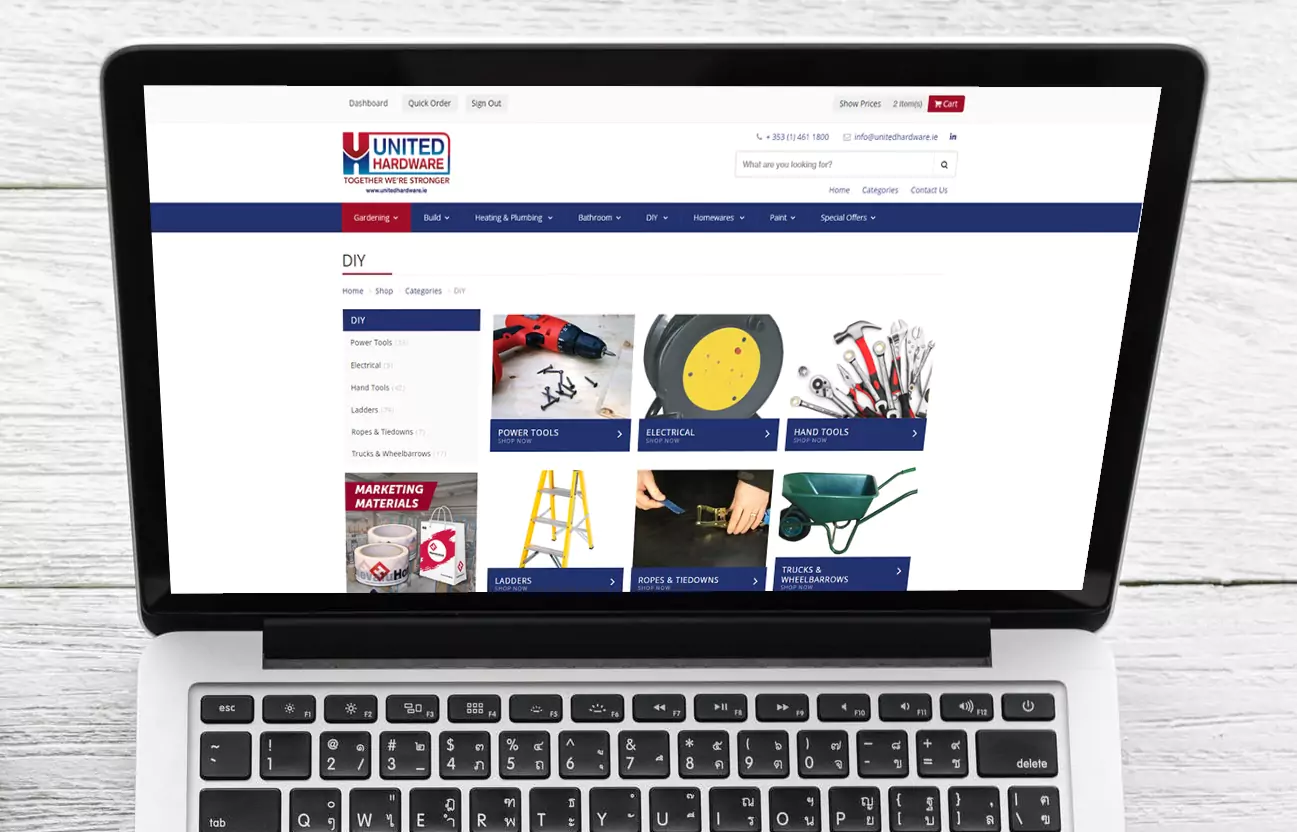
In Practice: United Hardware transformed their B2B ecommerce experience with Experlogix Digital Commerce. As they noted, “Experlogix Digital Commerce stands out not only for their state-of-the-art platform but also for their ability to solve complex issues, making them a true business partner.” By integrating with SAP Business One, they launched the ‘United Toolbox’ portal, enabling real-time inventory, self-service tools, and efficient operations—resulting in a 20% increase in online orders.
| ✅ Pros | ⚠️ Cons |
|---|---|
| Highly customizable and developer-friendly | Requires significant development and hosting resources |
| Supports multi-store, global commerce out of the box | Steep learning curve for non-technical teams |
| Strong third-party ecosystem and Adobe integrations | Slower time-to-value compared to SaaS competitors |
| Ideal for complex B2B or hybrid ecommerce needs | Ongoing maintenance costs can be high |
Your Integration Game Plan
If you’re still using Word templates and copy/paste, this is your shortcut to scale, speed, and accuracy.
1. Define The Parameters of Your Integration
Decide which data and processes to integrate
Start by identifying the specific data and processes that need to be integrated. For example, you might decide to integrate customer data, order management, and inventory levels. This means customer information from your ecommerce site will automatically update in SAP B1, and vice versa.
Set clear objectives and determine what success will look like
Clearly define what you want to achieve with the integration. If your objective is to speed up order processing, your success criteria might include reducing processing time by 30% within the first six months.
Tip: make sure your objectives are SMART—specific, measurable, achievable, realistic, and time-bound.
2. Choose Your Integration Method
The success of your integration hinges on how you integrate it.
There are a few ways you can approach this, including APIs, middleware, or direct database connections. Using an API might be the best option if you need real-time data exchange between systems, whereas middleware might be better if you need to integrate multiple systems with complex data transformations.
3. Create a (Realistic) Timeline
Put together a detailed project timeline with milestones
Break down the project into phases and set specific milestones within each phase. For example, you might have milestones for completing the initial data audit, setting up the integration environment, and carrying out pre-integration tests.
Assign responsibilities and timelines to team members
Integrating your ecommerce platform with SAP B1 requires all hands on deck. You’ll need the help of IT, operations, and even your web dev team—each of which will have its own role and set of duties.
Clearly assign tasks and responsibilities to team members as well as relevant deadlines. You might designate someone to handle the data cleaning process, while someone else oversees testing and validation.
4. Carry Out a Risk Assessment
Identify potential risks and challenges
There are always risks involved in switching up your tech stack and plugging together two very separate pieces of software. You might lose some data, experience system downtime, or run into compatibility issues. But as the saying goes, “failing to prepare is preparing to fail”. Jot down all the things that could potentially go wrong—for example, systems that support different data formats can create corrupt data if it’s not handled in the right way.
Decide how you’ll mitigate risks
Plan strategies to mitigate each of the risks you’ve identified. For example, you might thoroughly test your systems in a sandbox environment before going live to make sure data is compatible (and not corrupt). It’s worth having a rollback plan just in case you stumble on any critical issues during integration. This means you can revert back to the previous state without causing too many disastrous disruptions to your systems and data.
Let’s Get Technical
1. Get Your Systems Ready for Integration
Get SAP Business One ready for integration
In some cases, you’ll need to tweak the settings and capabilities in SAP B1 so it supports integration with your ecommerce platform. In particular, you might need to adjust how data flows between the two systems in your settings (again, this will be more effective if everything is clean and formatted in a uniform way).
Most people find they need to toggle on specific modules or features so their inventory and sales data can transfer between the two systems. Have a poke around your settings to see whether there are hidden buttons that need to be activated or whether you need to change some things to make it all work as it should.
If the systems aren’t speaking to each other at first, chances are it’s a simple fix like a toggle hasn’t been turned on somewhere.
Set up any modules and extensions you might need
Install any add-ons or extensions that will help with the integration For example, if you need extra reporting capabilities, you may need to install a reporting add-on with advanced analytics.
2. Set Up Any Necessary APIs
Create and test APIs to make sure they work as they should
Put APIs in place and test them to make sure they can handle transferring lots of data between the two systems. For instance, you can set up an API that automatically sends real-time inventory updates from your online store to SAP B1.
When the APIs are in place, it’s good practice to continuously test them to make sure they’re working as they should be.
Make sure your connections are secure and reliable
If you’re transferring lots of data back and forth, you can open yourself up to security weaknesses. Apply appropriate security measures so that data is fully protected while it moves from one platform to another—this might include using encryption protocols like HTTPS to safeguard customer information and private transaction details.
3. Map Your Data
Map data fields between your ecommerce platform and SAP Business One
You want to make sure both systems are speaking the same language. If your online store calls it “customer name”, check that SAP B1 isn’t calling it something completely different. Go through your existing customer data fields to check that they match up on both platforms—this will avoid any confusion as data moves from one platform to another.
Make sure data translation is consistent and accurate
If your online store uses inches and pounds but SAP B1 uses the metric system, it’s going to cause problems when they communicate between themselves (and you might end up thinking you have less stock than you do). Take a look at how your data is being moved around and make sure there are no mix-ups between centimeters and inches or kilos and pounds.
4. Custom Development
Imagine you need a super-specific report that pulls data from both your online store and SAP B1. Instead of juggling two separate reports and trying to piece them together, create a custom script that automatically collects the information you need and packages it up in a simple report.
Once you’ve got these custom scripts set up, throw different scenarios at them to see how they handle them. For example, you might see what happens if you suddenly get a hundred orders in an hour or if a product goes viral.
Time to Test and Validate
1. Initial Testing
Start by testing the basic functions of your integration to make sure everything is set up correctly—e.g. check if a new order placed on your ecommerce site appears in SAP B1. Look for any niggles or issues at this stage, such as data not transferring or incorrect information appearing in SAP B1.
2. Test Data Synchronization
Check that data updates in real-time (or as scheduled) between your ecommerce platform and SAP B1. For example, if you update a product price on your ecommerce site, check that the change takes place in SAP B1 too.
Take this opportunity to check that all data is accurate and consistent across both platforms. Do the inventory numbers match up? How about the sales figures? And is that new customer showing up correctly in both places?
3. End-to-End Testing
Test the entire workflow from start to finish to catch and iron out any wrinkles.
- Place a test order on your website
- Check that it shows up correctly in SAP Business One
- Make sure the inventory updates automatically
Keep an eye out for hiccups as you go through each step—if something doesn’t look right, fix it. For example, if order confirmation emails aren’t going out, you might need to tweak your email notification settings. Or, if there are discrepancies in inventory levels and they aren’t adjusting in real-time, check there’s not a syncing issue.
4. User Acceptance Testing (UAT)
Involve key stakeholders—such as sales and inventory managers—in testing the integration. They can provide valuable insights into how the system performs in real-world scenarios. You can have them process orders and update inventory levels to see if the system meets their needs.
Collect feedback while you’re doing this and log any issues or improvements.
In Practice: United Hardware transformed their B2B ecommerce experience with Experlogix Digital Commerce. As they noted, “Experlogix Digital Commerce stands out not only for their state-of-the-art platform but also for their ability to solve complex issues, making them a true business partner.” By integrating with SAP Business One, they launched the ‘United Toolbox’ portal, enabling real-time inventory, self-service tools, and efficient operations—resulting in a 20% increase in online orders.

Prepare to Go Live
1. Give It All a Final Review
Go through all your configurations and custom developments to make sure they’re set up correctly. Use this time to double-check all data mappings are accurate and that any custom scripts work as intended. If you find any issues during the testing phase, make sure they’re addressed and ironed out. Then, keep testing them until they work as they should every single time.
2. Get Your Training and Documentation in Place
Run training for all users
It’s time to roll out training sessions for everyone who’ll be using the new integrated system. For example, show the sales team how to process orders smoothly with the new setup and help inventory managers learn how to update stock levels.
Create detailed documentation for reference
Put together some handy documentation that users can refer to when they run into any bumps in the road. Include things like step-by-step guides, FAQs, and troubleshooting tips. For example, you might put together a guide on how to tackle common data entry issues.
3. Create Your Backup and Rollback Plan
Before you hit the “go live” button, back up all critical data and system settings. At the very least, you should back up customer data, order histories, and inventory records—but it’s well worth backing up all data that’s crucial for running your business. If you want to be extra cautious, create a Plan B so you can revert back to the previous system if there are any major issues with the new integration.
4. Create a Comms Plan
Outline how and when you’ll communicate important information about the go-live event. This might include emails, meetings, or updates on a project management platform—or wherever you chat with your teams.
Make sure all stakeholders—including employees, managers, and possibly even customers if appropriate—are aware of the timeline and any changes they should expect. Don’t forget to inform customer service teams about potential downtime or changes in order processing.
Post-Integration Best Practices
1. Regularly Monitor the Integration’s Performance
Closely monitor system performance
Regularly check the integration to make sure it’s working as you want it to. This includes monitoring the flow of data between your ecommerce platform and SAP B1, making sure that orders are processed correctly, and that inventory levels are updated in real-time. You can set up alerts to notify you of any data synchronization delays or if the system experiences any downtime.
Identify and address any post-go-live issues
Be prepared to quickly resolve any issues that might crop up after you go live. For instance, if users report problems with order processing, you can adjust data mappings or troubleshoot API connections to see what the issue is—and, more importantly, fix it ASAP.
2. Aim For Continuous Improvement
Get feedback from users
Make getting feedback from users a regular part of your schedule. You might hold periodic meetings or surveys to better understand any challenges your team faces or features they’d like to see.
Make continuous improvements to the integration
Use the feedback from your team to make ongoing improvements to the integration. If users find the interface tricky to navigate, consider redesigning it, or if they struggle to understand the workflow, create helpful tutorial documents that break it down. Remember that as your business grows, you may need to add new features or modules to support the increase in transactions.
3. Carry Out Regular Maintenance
Plan regular maintenance sessions to check on the health of the integration and run any necessary updates. This includes updating versions of software, applying security patches, and optimizing the system’s overall performance. It’s a good idea to schedule monthly checks to make sure all systems are running the latest versions.
In Practice: Time Products (UK) Ltd didn’t guess their way to better B2B sales—they built them with Experlogix Digital Commerce. By integrating with SAP Business One, they unlocked real-time pricing, streamlined ordering, and slashed manual errors. The result? Faster transactions, happier customers, and smoother operations. This is what Graham means when he says the right B2B platform does the heavy lifting.

By using this checklist, you’ll be ready to integrate your e-commerce platform with SAP Business One easily and successfully. You’ll benefit from smoother operations, more accurate data, and better customer experiences.
Download your free copy today and start your integration journey!