
If your claims operation runs on FastTrack, you already know what it does well: it holds the authoritative state of a claim — eligibility, benefit calculations, offsets, durations, diaries, payments and the decision history behind them. Everything that has to leave the system as a document tends to be messier. That includes acknowledgement letters, requests for medical evidence, approval and denial notices, benefit statements, overpayment and offset letters, closure correspondence and the employer or plan-sponsor communications that follow. Those documents are often assembled from several systems at once, kept in Word files scattered across teams, or hard-coded into templates that only a developer or consultant can safely change. That is how a one-paragraph regulatory wording update ends up waiting weeks in a queue.
TL;DR
- FastTrack is the system of record for claim state in life, disability and absence administration. Documents are the output of that state, and they usually need data FastTrack alone does not hold.
- Most document pain around claims administration is not about generating the document. It comes from template ownership, variation by jurisdiction and plan, approval evidence, proof of delivery and retention.
- A governed document layer sits alongside FastTrack rather than replacing it. The platform keeps owning the claim, while templates, assembly logic, approvals, delivery and archiving are centralised and maintained by the business.
- Experlogix Document Automation is one such layer. Templates are built with familiar Microsoft Word functionality, business rules apply jurisdiction-specific language and disclosures, every edit, approval and timestamp is logged for audit, and its API can connect to an unlimited number of data sources.
- API-led integration is a strength of this architecture, not a compromise. One set of validated interfaces handles both interactive letters and high-volume batch runs, and AI assistance stays inside governance, logging and human oversight.
Happy shiny people. Insurance marketing loves the image of policyholders living their best lives, untroubled by the catastrophes their cover protects them from. A centralised document layer lets claims, compliance and benefits professionals change wording accurately and quickly, without relying on IT for every edit, so the people behind the policy get to live their best lives too.
What FastTrack Owns, and What It Hands Off
Before discussing document automation around FastTrack, it is worth being precise about roles. The boundary between systems is where most implementation arguments happen.
FastTrack’s role is claims and benefits administration. That covers claim intake and registration, eligibility and coverage validation, benefit calculation, offsets and integration with other income sources, payment scheduling, diary and task management, and the decision trail. In group life, disability and absence or leave administration, it also means managing durations, return-to-work milestones and employer-level plan structures.
What it hands off, or at least shares, is the document outcome. A single disability claim decision letter may need:
- the claim facts from FastTrack
- plan wording and the schedule of benefits from a plan or policy repository
- participant and employer details from a CRM or HR feed
- jurisdictional notice language from a compliance-approved clause library
- brand elements that belong to marketing
Generating that letter is trivial. Generating it correctly, at volume, with evidence of what was sent and why, is the real job.
A useful rule of thumb when mapping this out: for every document, name the owner of seven things — the source data, the trigger, the template, the approval, the delivery evidence, the archive and the status write-back. If those seven owners cannot be named, the document will eventually become someone’s manual workaround.
- Source data
- Trigger
- Template
- Approval
- Delivery evidence
- Archive
- Status write-back
Where Document Complexity Actually Emerges

Life, disability and absence claims produce an unusual number of documents, and the complexity rarely shows up in the first draft.
Variation multiplies quietly. Wording varies by:
- jurisdiction (state, province or region)
- plan
- employer
- product (short-term disability, long-term disability, group life, waiver of premium, leave)
- language preference
- claim status
Multiply those dimensions together and a “small” letter library becomes hundreds of permutations. Teams that manage variation by cloning templates end up maintaining the same paragraph in dozens of files.
Effective dating matters more than version control. When a claim decision is reproduced two years later for an appeal, a regulator or litigation, the correct output is the wording that applied on the date of the original decision, not today’s wording. That means template editions and effective dates have to be real attributes of the template, not file-naming conventions.
Data is rarely ready to print. Benefit calculations need formatting and explanation. Offset tables need to be unpacked from structured data into readable schedules. Payment histories need filtering by period. Conditional paragraphs need to appear or disappear based on claim status, plan rules and jurisdiction. Traditionally, that logic is scripted, which is exactly how document changes become development tickets.
Volume arrives in waves. Routine correspondence is steady, but annual enrolment changes, plan amendments, mass benefit adjustments and period-end statement runs are not. A document architecture that handles a single interactive letter well but struggles with a 50,000-document batch only does half the job.
Failure paths are under-designed. Duplicate triggers, missing data fields, failed deliveries, partial batches and write-back errors are normal operational events. A dependable document layer decides in advance how each one is detected, retried, reconciled and evidenced. A fragile one finds out in production.
Documents Across the Claim Lifecycle
Mapping documents to each stage of the FastTrack claim lifecycle gives operations teams a concrete inventory to prioritise:
- Intake and registration: claim acknowledgements, authorisation and consent forms, and initial evidence requests to claimants, employers and treating practitioners.
- Adjudication: additional information requests, independent assessment notices, status updates while evidence is outstanding, and extension or delay notices where required.
- Decision: approval letters with benefit explanations, partial approvals, denial notices with the required appeal language, and waiver of premium decisions.
- Ongoing management: benefit statements, offset and integration notices, continued-eligibility and proof-of-disability requests, return-to-work and accommodation correspondence, and tax-related forms.
- Exceptions: overpayment notices and recovery schedules, suspension letters, appeal acknowledgements and appeal outcome letters.
- Closure: closure and termination notices, final payment summaries, and conversion or portability communications for group life.
- Employer, broker and plan-sponsor communications: claim activity reporting, plan-level summaries, experience communications and leave-management notifications.
- Internal and compliance output: audit packs, regulatory notices and evidence packages showing what was sent, to whom, when and under which approved wording.
Clear, automated correspondence at these points is not only about efficiency. Claimants phoning to chase claim status is a familiar source of friction. Automated status correspondence reduces those calls and leaves a searchable record of events if clarification is needed later.
One claim letter, five sources
One governed document layer assembles the letter, records the approval and keeps evidence of delivery.
Native Output and a Dedicated Document Layer Are Complementary
Claims administration platforms generally include correspondence and output capabilities, and nothing here suggests otherwise. The practical question is not whether FastTrack can produce documents. It is which documents are worth producing somewhere else.
Many insurers and benefits administrators settle on a split like this:
Keep native the documents that are tightly bound to claim state, low in variation, high in volume and rarely re-worded — simple system-driven notices and transactional confirmations.
Move to a dedicated document layer the documents that are highly variable, jurisdictionally sensitive, drawn from several sources, frequently re-worded by compliance, or shared across more than one administration system.
The second category is where centralisation earns its keep. Suppose your organisation also runs a policy administration system, a CRM, a billing platform and a legacy book on another core system. Maintaining five separate template estates means the same brand update, disclosure change and accessibility improvement get done five times. One governed template estate serving several systems, FastTrack among them, is a much simpler operating model. It is worth evaluating rather than assuming either way.
This is one architectural option among several. Some organisations will reasonably keep more in the core platform. The decision should follow document variability and ownership, not vendor preference.
Integration Architecture: One Setup, Ongoing Leverage
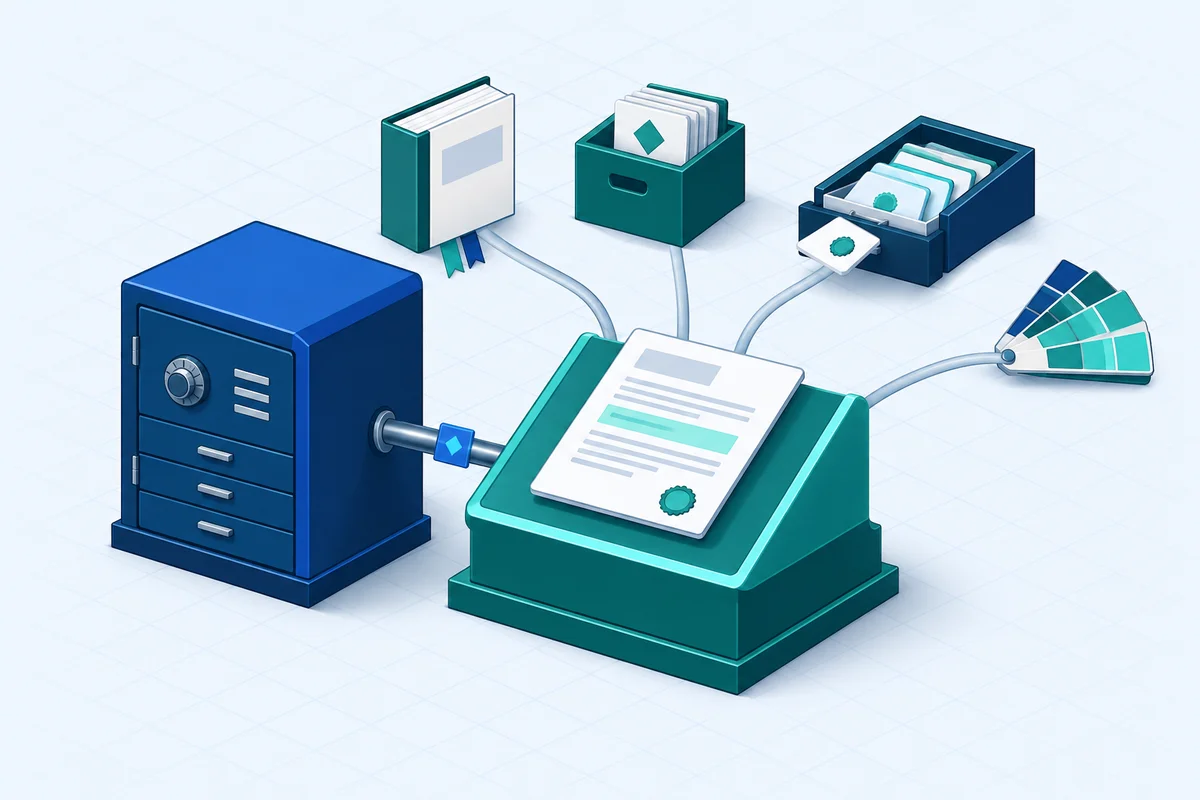
API-led integration is the right pattern here, and it is a strength rather than a concession. Experlogix Document Automation provides a flexible API with role-based API keys, an extensive library of API calls and programmable functionality. That lets document generation and workflow capabilities be embedded into virtually any application. It can also connect to an unlimited number of data sources, which is exactly what is needed when a single letter draws on claim, plan, participant and compliance content at once.
In practice, the design work is done once and keeps paying off:
- Triggers: decide which FastTrack events call the document layer immediately (an adjuster generating a letter on screen), which go into a queue, and which run on a schedule or in batch.
- Data contract: agree the payload structure, required and optional fields, nested structures that need unpacking, calculated values, and what happens when a field is missing. Missing-data rules belong in the contract, not in the template author's head.
- Identity and access: service identities for system-to-system calls, role-based access for template authors and approvers, and separation between the people who draft wording and the people who approve it.
- Delivery and archive: email, print, portal and e-signature routing, with the final document and its metadata written to the archive of record and references written back to the claim.
- Observability: protection against duplicate processing when events are retried, reconciliation for partial batches, monitoring of delivery failures, and performance testing against your real peak, not your average day.
Workflow orchestration can extend beyond the document platform itself. Experlogix Smart Flows integrates with Microsoft Power Automate, including automated, scheduled and business process flows, and with SharePoint document libraries. Approval routing, storage and downstream processing can therefore use the Microsoft tools many insurers already run. Smart Forms can collect information the systems of record do not hold and feed it into document workflows, so claimants and employers are not asked repeatedly for information the organisation already has.
Once that foundation exists, adding the next document type, jurisdiction or source system becomes configuration rather than a project.
Business Ownership Without Losing Control

The strategic reason to centralise documents around FastTrack is not technical elegance. It is about who gets to make changes.
The Template Builder in Experlogix Document Automation works in familiar Microsoft Word. Business users can build and maintain templates with dynamic data fields pulled from connected systems, embed jurisdiction-specific content, and include dynamic tables and graphics. Automatic language selection means they do not have to maintain separate template versions by hand. A low-code, drag-and-drop workflow builder lets operations teams assemble document flows while keeping the load on IT down.
Control does not loosen as a result. Embedded business rules apply jurisdiction-specific language and disclosures automatically. Every action — edits, approvals, timestamps — is logged in audit trails, giving a regulator-ready record. Metadata tagging and automated archiving make documents easy to retrieve when an audit arrives.
A division of labour that works:
- IT and security own integration, identity, environments, monitoring and release control.
- Claims operations and compliance own wording, templates and approvals.
- Produit owns jurisdiction, edition and effective-date decisions.
IT sets the platform up once and then stops being the bottleneck for every paragraph change.
AI, Governance and the Limits of Automation in Regulated Claims
AI is genuinely useful around claims correspondence, and it is genuinely constrained by the regulatory environment. It is best treated as a tool for productivity and orchestration, not decision-making.
Where it helps:
- drafting new template content that compliance then reviews and approves
- suggesting where conditional logic should apply
- speeding up workflow configuration
- checking drafts for consistency against approved content
- summarising what a document set contains
Agent-initiated workflow is where it gets more interesting. Experlogix Document Automation offers the Smart Flows MCP Server. MCP (Model Context Protocol) is the emerging standard that lets AI agents connect to existing systems, such as policy management platforms, CRM and compliance engines, in a structured, auditable way. Through the MCP server, an agent can find out which governed Smart Flows are available, what inputs each one needs, how to run it and how to retrieve the documents it produces.
In practice, a claims handler could ask their organisation's AI assistant — for example, an agent built in Microsoft Copilot Studio — to produce a required claim communication. The document layer would then run the governed workflow behind it: pulling data from the authorised systems of record, selecting the approved template and jurisdictional wording, routing for the required approvals and delivering through the correct channel. Agents operate within parameters the organisation defines. Every document generated is traceable and every agent action is logged, so the agent extends the existing workflow transparently rather than acting as a black box.
What should not change: eligibility, benefit entitlement, medical assessment and claim decisions stay with authorised people and systems. AI should assemble, assist and route. It should not adjudicate. If the underlying process is not sound before AI is applied, AI will add complexity rather than productivity. That is an argument for getting document governance right first.
Summary
FastTrack holds the truth about a claim. Documents are how that truth reaches claimants, employers, brokers, regulators and auditors. They are usually where the operational friction lives, because they draw on several systems, vary by jurisdiction and plan, change whenever regulation changes, and have to be justified after the fact.
Three findings are worth carrying forward:
- The boundary decision matters more than the tooling decision. Before choosing where each document is produced, name the owner of its data, trigger, template, approval, delivery evidence, archive and write-back.
- Centralise the documents that cause the most work. Moving the variable, multi-source, frequently re-worded documents into a governed layer alongside FastTrack preserves your core investment while removing duplicated template estates across systems.
- Business ownership is the benefit that compounds. Word-based templates, rule-driven jurisdictional language, logged approvals and audit-ready archives let claims and compliance teams move at their own pace while IT keeps control of security, integration and releases.
A sensible next step is unglamorous but effective. Inventory your current claim correspondence and tag each item by variability, jurisdictional sensitivity, volume profile and number of source systems. Then use that inventory, not a vendor demo, to decide which documents stay native, which belong in a centralised document layer, and which failure paths need designing before the first letter leaves the building.
Frequently Asked Questions
What role does FastTrack play, and where does document production begin?
Before discussing document automation around FastTrack, it is worth being precise about roles. The boundary between systems is where most implementation arguments happen. FastTrack's role is claims and benefits administration. That covers claim intake and registration, eligibility and coverage validation, benefit calculation, offsets and integration with other income sources, payment scheduling, diary and task management, and the decision trail.
Where does insurance document complexity arise around FastTrack?
Life, disability and absence claims produce an unusual number of documents, and the complexity rarely shows up in the first draft. product (short-term disability, long-term disability, group life, waiver of premium, leave)
When is native document output enough alongside FastTrack?
Claims administration platforms generally include correspondence and output capabilities, and nothing here suggests otherwise. The practical question is not whether FastTrack can produce documents. It is which documents are worth producing somewhere else.
How should a governed document layer connect with FastTrack?
API-led integration is the right pattern here, and it is a strength rather than a concession. Experlogix Document Automation provides a flexible API with role-based API keys, an extensive library of API calls and programmable functionality. That lets document generation and workflow capabilities be embedded into virtually any application.
Who should own document templates, approvals and governed changes?
The strategic reason to centralise documents around FastTrack is not technical elegance. It is about who gets to make changes. The Template Builder in Experlogix Document Automation works in familiar Microsoft Word. Business users can build and maintain templates with dynamic data fields pulled from connected systems, embed jurisdiction-specific content, and include dynamic tables and graphics.